PTZ Controller Comparison
Choose a PTZ controller by the workflow, not just the spec sheet.
KC10N, KC20Pro, and KC50N all control PTZ cameras. The right choice depends on the room, camera count, operator skill, tally needs, preview needs, and how often the production repeats.
Quick Recommendation
The simple answer
Model Overview
KC10N vs KC20Pro vs KC50N
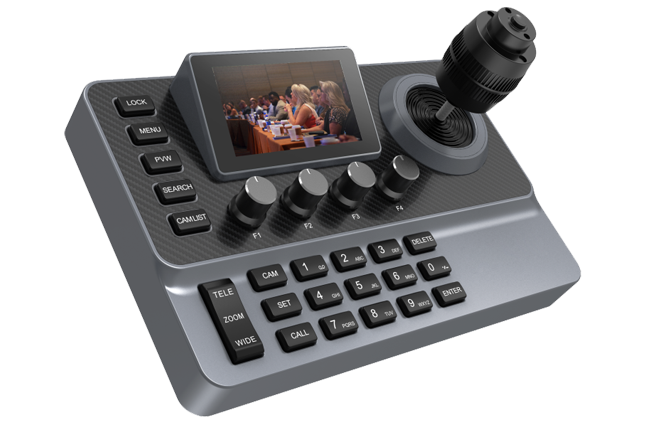
KC10N
$499Entry PTZ control
Best for
Small churches, classrooms, and simple 1-3 camera setups.
Not ideal when
The operator needs many direct buttons, tally channels, or a larger preview/control desk.
- 3-inch screen
- 20 buttons
- 4 knobs
- 4K30 preview
- Up to 1000 cameras
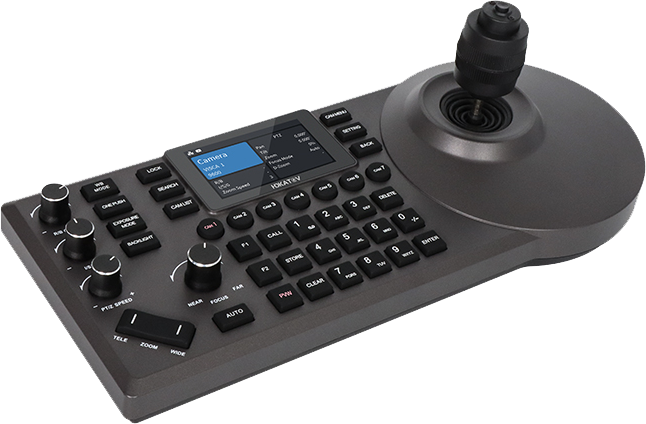
KC20Pro
$899Balanced church and event controller
Best for
Weekly church livestreams, school events, and teams that need more buttons without a large desk.
Not ideal when
The setup needs the largest screen, more knobs, or a more advanced operator surface.
- 3-inch screen
- 36 buttons
- 4 knobs
- 7 tally channels
- 4 network segments
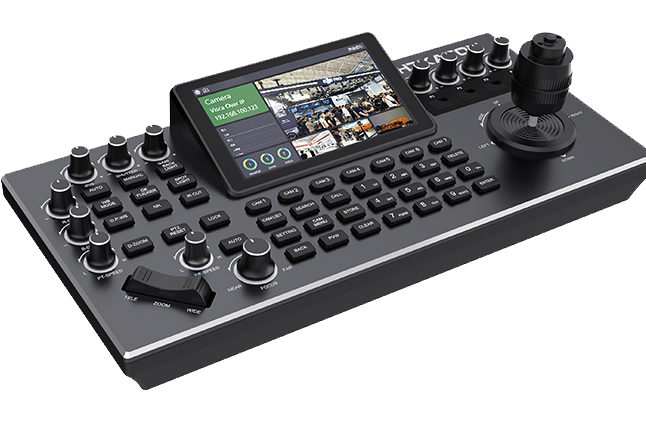
KC50N
$999Advanced PTZ control desk
Best for
Larger camera fleets, studios, live events, and operators who want more preview and hands-on control.
Not ideal when
The room is small, the camera count is low, or the volunteer team needs the simplest possible surface.
- 5.5-inch screen
- 41 buttons
- 12 knobs
- 7 tally channels
- Multi-preview monitoring
Use Case Matrix
Which PTZ controller fits each scenario?
Church live streaming
Most churches need more than entry control but still need a surface volunteers can learn quickly.
Use KC10N for smaller rooms. Use KC50N when the church has more cameras or a stronger operator.
School and classroom production
Schools usually need simple preset recall, basic joystick control, and a lower entry cost.
Use KC20Pro if the school runs events, assemblies, or multiple camera zones.
Small studio
A studio benefits from extra buttons and tally without needing the largest PTZ panel immediately.
Use KC50N if the studio needs more direct control and multi-preview confidence.
Conference and live event
Events move fast, so more buttons, more knobs, and better visual feedback reduce operator hesitation.
Use KC20Pro for simpler rooms or repeatable event layouts.
Multi-camera control desk
The larger surface gives the operator more dedicated control for camera groups, presets, and adjustments.
Use KC20Pro when budget or desk space matters more than maximum control density.
Decision Rules
Use these rules before you compare every feature.
Choose KC10N when
Budget is tight, camera count is low, and the operator mostly needs joystick control and preset recall.
Choose KC20Pro when
The setup is a weekly production workflow with more buttons, tally needs, and moderate operator complexity.
Choose KC50N when
The operator needs the most control density, larger preview, more knobs, and a more advanced PTZ desk.
Buyer Profiles
Match the controller to the person who will operate it.
Volunteer operator
KC10N or KC20ProThe controller should reduce hesitation. A volunteer usually needs clear presets, basic joystick control, and a surface that does not feel intimidating.
Weekly production team
KC20ProThis is the middle ground for churches, schools, and meeting rooms that repeat the same production every week and need more buttons and tally confidence.
Experienced operator
KC50NA stronger operator can use more knobs, screen space, and control density to move faster across a larger camera fleet.
Budget-constrained buyer
KC10NIf the room is small and the camera count is low, spending more on control density may not improve the actual show.
Buying Factors
What matters more than the model number?
Camera count
More cameras usually means more presets, more direct access, and more operator pressure.
Operator skill
A volunteer team should prioritize clarity. An experienced operator can benefit from more controls.
Tally and feedback
Tally helps operators know what is live, which reduces mistakes during service or events.
Preview needs
A larger screen or multi-preview view is useful when the operator must trust shots before taking them live.
Avoid These Mistakes
The wrong choice usually comes from judging the wrong variable.
A PTZ controller is not only a spec decision. It is an operator-confidence decision. The best model is the one that fits the room, control protocol, and real production pressure.
Buying the largest controller too early
A larger surface does not fix unclear presets, weak audio routing, or an untrained operator. It can make a simple room feel harder than it needs to be.
Choosing only by camera count
Camera count matters, but operator skill, tally needs, preview confidence, and how often the workflow repeats can matter more.
Ignoring the control protocol
Before choosing a controller, confirm whether the cameras use VISCA over IP, serial control, NDI control, or another control path.
Related Workflows
Turn the controller choice into a complete setup.
FAQ
Common PTZ controller selection questions
Which PTZ controller is best for churches?
KC20Pro is the best starting recommendation for many churches because it balances price, button count, tally support, and workflow flexibility.
Is KC10N enough for a church livestream?
Yes, if the church has a small room, a low camera count, and simple preset needs. For weekly multi-camera production, KC20Pro is usually safer.
When should I choose KC50N?
Choose KC50N when the operator needs more direct controls, more knobs, a larger screen, and better confidence for larger camera fleets or event work.
Should I choose by price or by camera count?
Use price as a constraint, but choose by camera count, operator skill, tally needs, preview needs, and how often the workflow repeats.
What is the safest first step if I am still unsure?
Write down the room type, camera count, control protocol, operator skill level, and weekly workflow. Then compare by use case before choosing the cheapest or most advanced controller.
Next Step
Not sure which controller fits your camera fleet?
Send your camera count, camera brand, control protocol, room type, operator skill level, and budget. AVCLUE can recommend the right PTZ controller and workflow path.
Ask AVCLUE on WhatsApp