Start
Confirm vMix version, camera count, replay channels, operator role, and whether the setup is LAN or direct USB.
vMix Replay Control
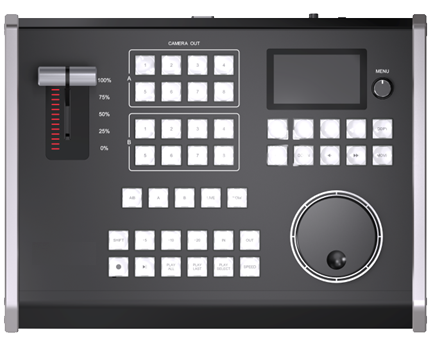
KD61B is built for vMix operators who need faster replay decisions: mark clips, choose cameras, control playback, adjust speed, and return to live without hunting through a mouse-driven interface.
Confirm vMix version, camera count, replay channels, operator role, and whether the setup is LAN or direct USB.
Decide whether the bottleneck is replay speed, operator confidence, control mapping, or cable deployment.
Build a repeatable replay workflow that can be reused across sports, worship, events, and training projects.
Best Fit
This page is designed for visitors who already understand vMix but need to decide whether dedicated replay hardware is worth adding.
Use KD61B when the operator needs fast IN/OUT marking, event list control, A/B camera selection, and jog-wheel speed control during live action.
Use KD61B when one operator needs tactile replay control without relying on a mouse during sermon, worship, or event highlight moments.
Use KD61B when TCP over LAN, PoE power, and browser-based configuration are more practical than a direct USB-only control surface.
KD61B
KD61B focuses on the replay actions that are hard to perform quickly with only mouse and keyboard: IN/OUT marking, event list movement, A/B camera selection, playback, live return, T-Bar speed, and jog-wheel search.
Workflow Learning
These pages let visitors self-educate before they contact you, which is useful for SEO and also filters better leads.
Understand the full live replay loop from capture to output before choosing hardware.
Follow the practical setup path for connecting KD61B with vMix.
Compare network control and USB-MIDI control before deciding how to deploy the panel.
See functions, specs, power options, protocols, and the product detail page.
Recommendation
Tell us your event type, vMix version, camera count, replay channels, and whether you prefer LAN/TCP or USB-MIDI control.